
Audit history, integrity and evidence
Interpret recorded changes, investigate operational failures and export retained audit evidence with a clear understanding of what integrity verification establishes.
Start with the question you need to answer
Use Security › Audit Logs to investigate recorded changes and sensitive actions. Use a record's own history for its workflow context, such as a return, completed RMA or disposal. Use Security › Diagnostics to investigate operational errors. These sources overlap through identifiers and audit events, but each answers a different question.
A before-and-after record describes values captured by the application. It does not independently establish that equipment moved, a repair worked or a device reported those values. Compare the record with the relevant observation, physical check or supporting document. Keep the observation time separate from the time somebody entered or changed information.
Find an event without overstating the search
- Open Audit Logs and review Events, Span shown and Chain under Audit trail standing. These describe the displayed history and the latest chain check; they are not a count of everything that happened in the district.
- Choose an Event kind where available. Use Search audit events for an action, actor, record or correlation ID, and Filter by actor to narrow the loaded rows.
- Check any notice about the loaded window. Search cannot find entries older than that window. Load next 100 reveals more of the matching loaded history; it does not promise an unrestricted historical search.
- Open the event and confirm its action, actor, target and time. A name is the name recorded in that event. A deleted target can remain identifiable in history without being an available current record.
- Open Record evidence to inspect Correlation ID and Entry digest (SHA-256). Copy correlation id when coordinating an investigation; retain the event ID and exact time as well.
Interpret changed fields and missing values
Changed fields shows Before and After when both snapshots exist. A one-sided event instead shows Recorded values or Previous values. No field-level change was recorded for this event means that a comparable field change was not captured; it does not cancel the event or establish that nothing happened.
Not set represents an empty recorded value. Not recorded for a correlation ID or digest means that evidence is unavailable in that field. Sensitive values are redacted, and large or deeply nested payloads are bounded. Audit history is therefore not a complete backup of every value or secret.
Check exact timestamps when ordering events across time zones. Some workflow history contains a calendar date rather than a precise instant. Do not infer an hour from a date-only record or equate an operator-entered occurrence date with the application's recording time.
Understand who can see the evidence
Page access, action permission and account capability all matter. District audit rows do not carry a department. Administrator EX can always read the district-wide history. An Auditor can read it unless a page rule blocks Audit Logs. A Department Admin may open the page but sees a scope notice instead of district entries.
An accessible asset's change history can show event summaries and changed-field names without granting access to the underlying before-and-after values. Detailed values additionally require audit access. Workflow histories follow their own inventory page permissions. A visible record does not automatically grant permission to export district evidence.
Export evidence requires Download on Audit Logs and district audit capability. Diagnostics has a separate administrator access requirement; changing a resolution or running a validation script additionally requires Edit. Ask an authorized person to retrieve evidence when access is denied rather than interpreting a restricted view as an empty history.
Audit data in Explore, its exports and saved reports also need district audit access. Permission to open an analytics page does not grant access to district audit records. Administrator EX and auditors retain their permitted audit access; a Department Admin does not gain it through an alternate report.
Read the chain result precisely
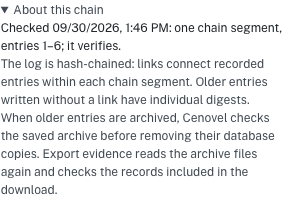
About this chain explains segment boundaries and older entries. Separate segments verify independently; pre-chain entries have individual content digests rather than links establishing a continuous chain. The ordinary chain check validates live rows and archive checkpoint links. It does not reread every archive file; the evidence export performs that additional check.
A digest detects disagreement with specified stored content. It does not prove factual accuracy, a person's intent, completeness of all real-world actions, or resistance to someone able to rewrite both content and hashes. The event digest covers the documented fields, including actor, snapshots and previous digest, but excludes the event ID and occurrence timestamp. It is not an independent time attestation or digital signature.
Scroll the table sideways to read all columns.
| Result | Meaning |
|---|---|
| Verified | The checked event content and links satisfy the implemented verification rules. Read the check time and segment explanation. |
| Broken at entry | Verification found a mismatch at the identified entry. Preserve the details and investigate. |
| Could not verify | The check could not run. Integrity is unknown; this is not a confirmed broken chain. |
| Not verified yet | There is no completed verification result since startup. Wait for a result before relying on it. |
Export and retain a verified package
- Choose Export evidence. The operation verifies and gathers retained live events and sealed archive segments, independent of the current table filters.
- Keep the resulting CENOVEL-AUDIT-EVIDENCE dated .json.gz file with the investigation. Review generation time, event counts, first and last IDs, segment details and verification statement.
- For an independent checksum comparison, decompress and parse the JSON, serialize its evidence member compactly with JSON.stringify, and calculate SHA-256. Compare that value with manifest.contentSha256. Hashing the compressed file or indented JSON produces a different value.
- Preserve the original package and record where it came from. The package checksum covers exported evidence, including its timestamps, but a checksum supplied alongside content does not authenticate its source. The export action is itself audited after the package is assembled.
Investigate failures and unavailable evidence
In Diagnostics, choose Open, Resolved or All, then filter severity, source or Search diagnostics. Review the correlation ID and failure details. Marking an error resolved records an administrative decision and note; it does not perform a repair. Reopen restores its investigation state. Those resolution changes produce audit events.
Show validation scripts and retention exposes allowlisted checks, their timeout and results. A passed script establishes only that check's result. Resolved-error retention is separate from audit retention; it is not a control for deleting audit history.
Unavailable storage, unreadable archives, failed verification or export ceilings can prevent a download. The current export ceiling is 100,000 events and 64 MiB of uncompressed JSON. Escalate the precise failure rather than presenting a partial selection as the complete package. Sealing an archive can remove its live database rows after verification while retaining evidence in the archive; archive availability remains essential.
Limits of this guide
- This guide is based on the application source and focused automated checks, including a refused export of a deliberately corrupted archive. It is not an acceptance test of your appliance.
- Routine chain verification checks live rows and the links between archives; an evidence export also rereads the archive files. A verified archive transfer can remove the covered live rows while keeping their archive evidence.
- Event digests leave out occurrence times and event IDs. The export checksum covers the exported values but is not an independent timestamp or a digital signature. Integrity checks do not certify that the recorded events were operationally true or compliant.
- The rule that audit data in analytics needs district audit access may not be in your installed version. Check your release notes.
Reviewed against the current source code. Confirm the behavior and available actions on your installed release.