
Check a closet’s capacity
Find out whether a closet can take more devices: free ports by type, PoE remaining and reclaimable ports, from each switch’s last read.
GuideReviewed against the application source on 3 October 2026
The question
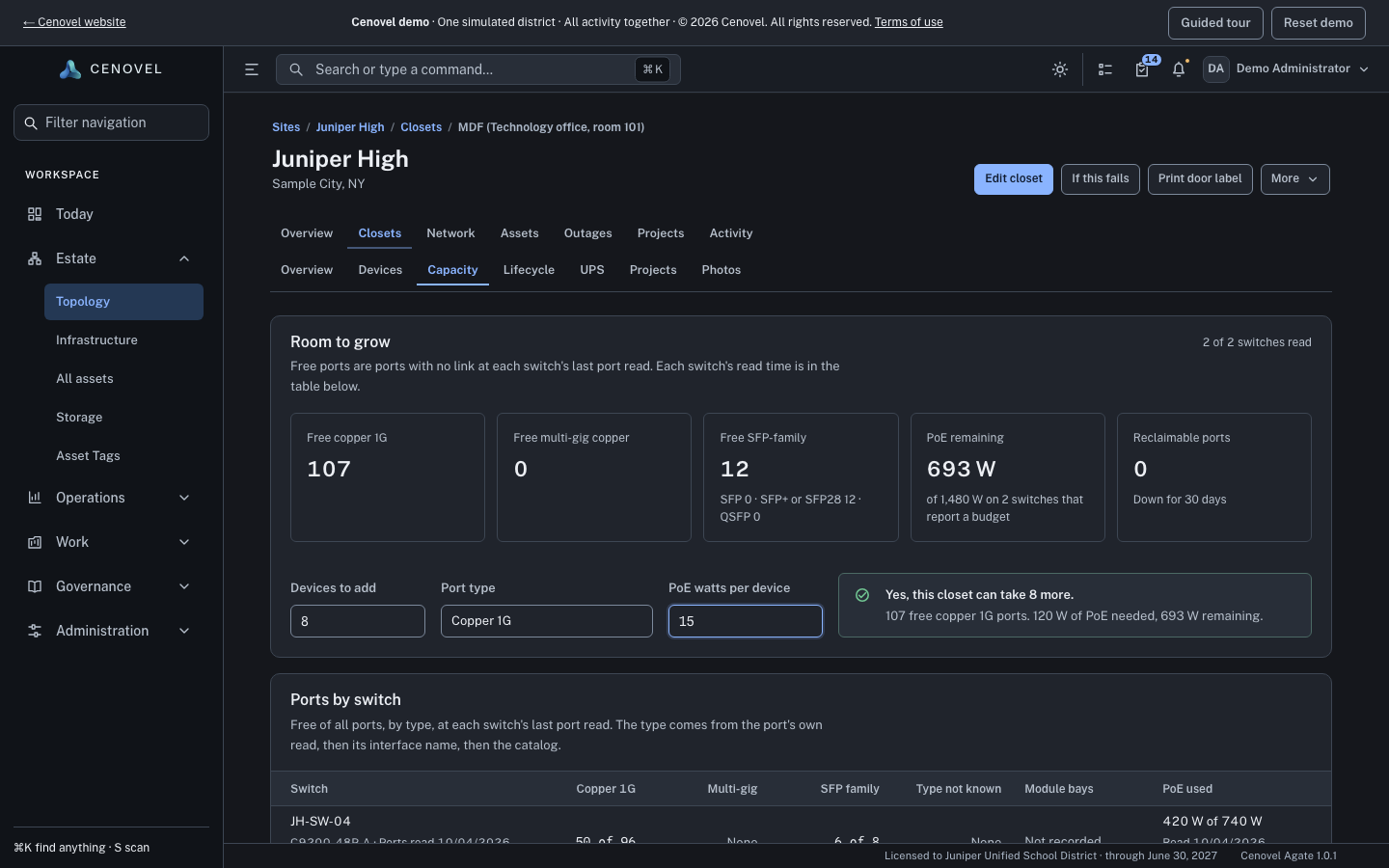
Can this closet take eight more cameras, and is there power for them? Open the closet and choose Capacity. Everything on it comes from each switch’s last port read, and each switch’s read time is in its table.
Steps
- Read Room to grow. Its cards show free copper 1G ports, free multi-gig copper ports, free SFP-family ports (SFP, SFP+ or SFP28, and QSFP counted separately), PoE remaining against the budget, and reclaimable ports.
- Under the cards, enter Devices to add, choose the Port type, and, for powered devices, the PoE watts per device.
- Read the answer beside the fields: “Yes, this closet can take 8 more.” or “Not with what was read.”, with the free ports and the power needed against the power remaining.
- Check Ports by switch for where the free ports are, and Reclaimable ports for ports you could free up.
What each state means
| What you see | What it means |
|---|---|
| A number of free ports | Ports with no link at that switch’s last port read. A free port is not proof the port is unused or patched; check the cabling before you plan on it. |
| Not read | No switch here has a port read Cenovel can use, so nothing is counted. It is not zero. |
| A switch “not counted” | A warning names each switch that was not read (never read, no management address, or not answering Cenovel). Free ports and the answer leave it out. |
| PoE “Not read” | No switch here reported a PoE budget, so power is not known. The answer says power is not known rather than yes. |
| Module bays “Not recorded” | The catalog has no slot information for that model. |
| Reclaimable port | Down on every daily read for the last 30 days (read on at least 20 of them) and still down at the last read. The rule is shown on the page. Ports without daily reads are not counted. |
Recorded cabling
The closet’s recorded line counts and cabling are on Capacity too, below the port tables. They are what someone recorded in the survey, not a device read.
Ask the demo’s MDF at Juniper High whether it can take more devices.
Open Capacity in the demoSee also: Plan a closet visit · Device reads and monitoring
Describes the release being prepared for deployment. Check the behavior on your installed release.