
Licensing and renewals
What Settings › License shows, how to import a license, what happens over the site count and when the term ends, and what read-only still allows.
GuideReviewed against the application source on 3 October 2026
The question
Is our license in order, how many sites are we using, and what happens if we go over or the term ends? Each district has one signed license file, cenovel-license.json. It names the district and its NCES district ID, the number of sites licensed, the term, and whether it is a pilot or a founding customer license. Cenovel checks the file’s signature on the appliance; no internet connection is needed. For a renewal or more sites, contact Cenovel.
Whatever the license says, monitoring, alerts, sign-in, reading, exports and backups never stop.
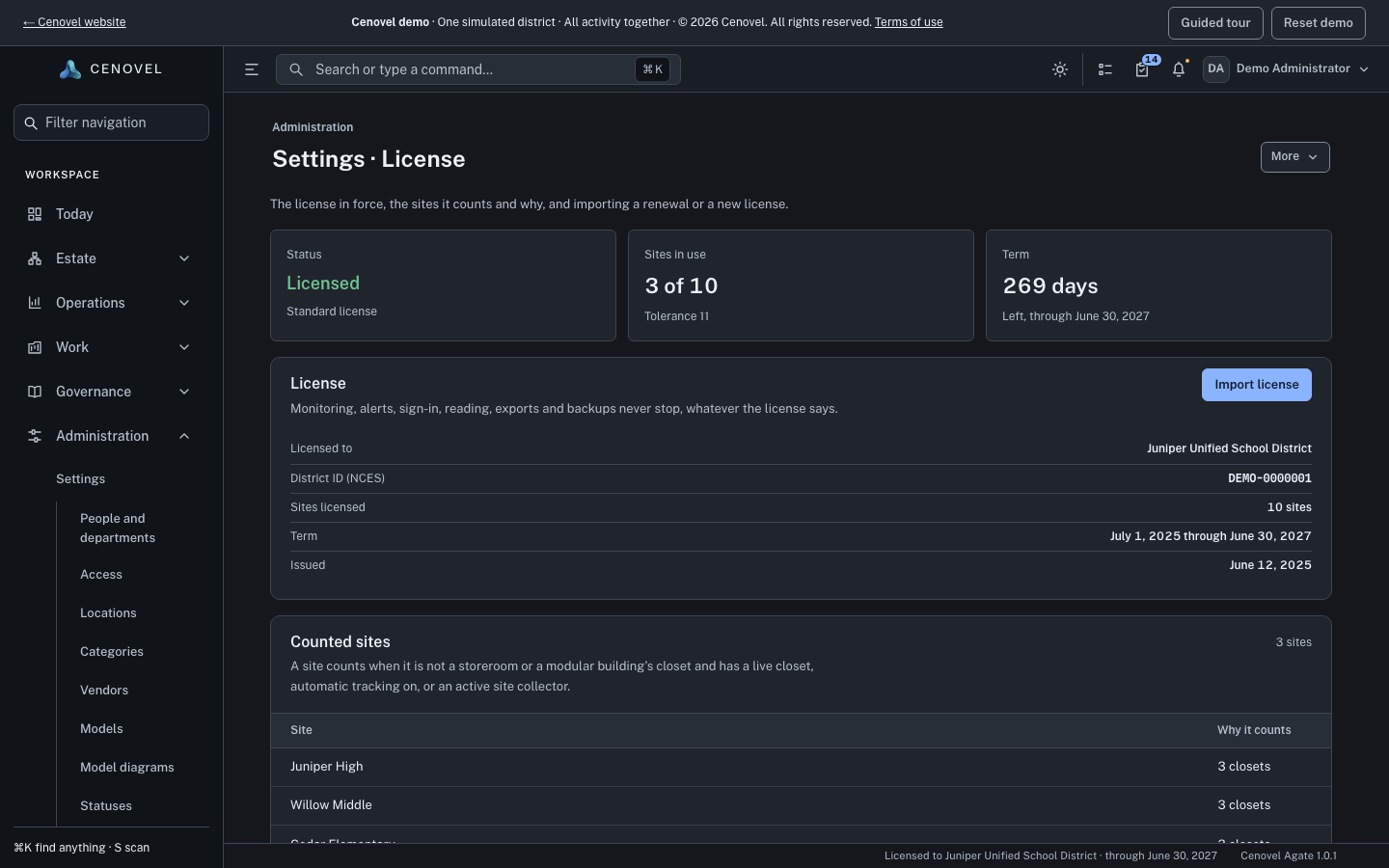
What Settings › License shows
Open Settings › License. The page is for Administrator EX accounts.
- Status
- Licensed, Pilot, Renewal due, “Over the site count, within tolerance”, Over the site count, “Ended, in grace”, Read-only, No license, or No license imported, with the kind of license under it.
- Sites in use
- “N of M” sites counted against the license, with the tolerance, or when the count went over and when its grace ends.
- Term
- The days left and the end date, or the days of grace left.
- License
- The license in force: licensed to, the district ID (NCES), sites licensed, the term and when it was issued. A renewal or an amendment says from when it covers. A license imported before its start date is listed under Next license.
- Counted sites and Not counted
- Every place, and why it counts (its closets, automatic tracking on, or its site collectors) or why it does not.
- License history
- Every license imported, with its sites, term and standing (Current, Starts later, Replaced), and who imported it when.
Administrators also see a quiet line in the console footer, for example “Licensed to Sample District · through June 30, 2027”.
Import a license
- In Settings › License, choose Import license.
- Paste the contents of cenovel-license.json, or choose Choose file.
- Choose Import license. Cenovel checks the signature first, then says what it imported, for example “Imported the license for Sample District: 40 sites through June 30, 2027.”
A file that fails the check is not imported, and the page says why: the file is not a Cenovel license, it was changed since it was issued, it was not issued by a key this release trusts, or it was revoked. Ask Cenovel for a reissued license in the last two cases.
A license can be imported at any time, including while the console is read-only. A renewal imported early waits for its start date, so nothing changes before then.
What counts as a site
A place counts when it is not a storeroom and has at least one of: a closet, automatic tracking turned on, or an active site collector. Inventory, spares, history and the closets inside a counted site never add to the count. A place with none of them reads “No closet, automatic tracking or site collector”; a storeroom reads “A storeroom: storage is never counted”. A modular building’s closet counts with the site it stands at; one in transit, with a vendor or retired is not at a site and does not count.
When you go over the site count
| What happens | What it means |
|---|---|
| Within the tolerance | The tolerance is the licensed sites plus 10% of them, or plus one, whichever is more. Administrators see a notice: “That is within the tolerance…, so nothing is limited. The count is settled at renewal.” |
| Beyond the tolerance | 30 days of grace, counted from the first day over. Administrators see a banner with the date it ends: “Import a license for more sites, or remove sites, by …” |
| After 30 days | The console is read-only: “This Cenovel license covers N sites and M are in use. The console is read-only until the license is updated or sites are removed.” |
Two ways out, at any point:
- Import a license with more sites. Contact Cenovel. It covers the added sites from the day the count went over, and importing it lifts read-only at once.
- Retire sites. Remove a site, turn its automatic tracking off, disable or remove its site collector, or delete a closet. These are the only changes allowed while the console is read-only for this reason, and each is recorded in the audit log.
When the term ends
- From 90 days before the end, administrators see “The license ends on …”. Import the renewal when it arrives: it takes effect on its start date.
- After the end date there are 30 days of grace, with a banner: “Import a renewal by …, or the console becomes read-only.”
- After the grace, the console is read-only: “This Cenovel license has expired. The console is read-only until a renewal is imported.”
- A renewal starts on the old end date, so the grace days are covered and nothing is lost. Importing it lifts read-only at once.
A pilot license covers up to 5 sites for 90 days, and its end follows the same rule: 30 days of grace, then read-only, until the district’s license is imported.
What read-only allows
| Still works | Refused |
|---|---|
| Signing in, reading every page, exports and backups | Changes to records, which are refused with the read-only message |
| Scheduled polling, outage detection and alerts: monitoring keeps running | Manual reads such as Poll now, which count as a person’s change |
| Importing a license, and retiring sites when over the count | Adding sites |
Everyone sees the banner “Cenovel is read-only” with the reason. Pages become view-only, so their edit controls disappear.
When the server’s clock is wrong
Cenovel judges the license by the latest time it has trusted, so moving the server’s clock cannot stretch a term or a grace period.
- The clock jumps ahead. Settings › License says “This server’s clock jumped ahead”, and the license is still judged from the last trusted day until the new time holds steady for three hours.
- The clock is behind a time Cenovel already trusted. Settings › License says “This server’s clock is behind” and keeps judging from the later day. If that later reading was the mistake, correct the server’s time, then choose The clock was wrong. Cenovel accepts it once the deployment’s time source confirms the clock, or, with no time source set, after three steady hourly checks. Every attempt is recorded in the audit log, and it is allowed while the console is read-only.
- If the clock made the console read-only. A time source is a setting, and settings can’t be changed while the console is read-only, so don’t wait for one. Correct the server’s time, then choose The clock was wrong: with no time source set, Cenovel accepts it after three steady hourly checks, and read-only clears.
Without a license
- A new install works with up to 5 sites. Adding a sixth is refused: “License limit reached. Existing sites are unaffected.” Import a license to add more.
- An install that already held data when it was upgraded has 90 days with a notice to administrators only (“No license imported. Nothing is limited until …”). Nothing is refused in that time. Import the district’s license before it ends.
- A console that held a license and no longer has one, because it was removed or no longer verifies, is read-only until a license is imported again: “This console’s Cenovel license is missing or can’t be verified.”
See also: Upgrades & rollback · Permissions and departments · Backup & restore
Describes the release being prepared for deployment. Check the behavior on your installed release.